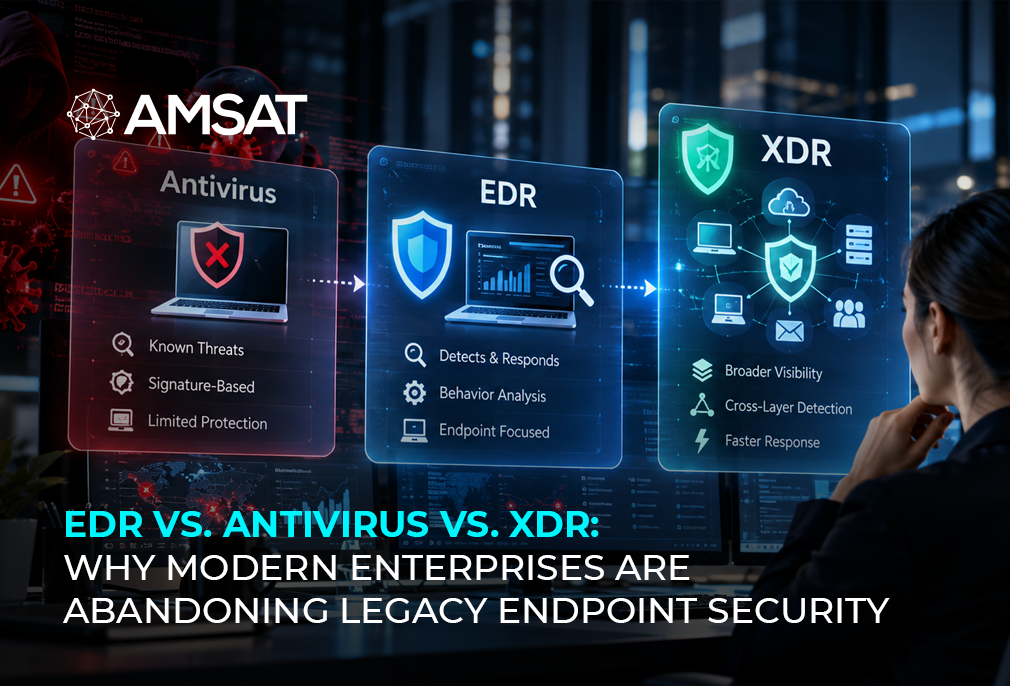
Implementing endpoint detection and response is easier when you break it into a clear, structured approach. Rather than trying to configure everything at once, organizations can roll out the solution in phases while building a stronger security posture along the way. This 90-day roadmap outlines what to focus on at each stage, from planning and deployment to continuous monitoring and proactive threat hunting.
Selecting an endpoint detection and response solution is easier than actually implementing it. Moving from evaluation to day-to-day operations often involves more time and coordination than expected. The Kaseya 2025 global IT trends and priorities report found that EDR adoption among mid-market enterprises increased from 49% in 2024 to 65% in 2025, making it the most widely used IT management tool in the survey. As more organizations adopt EDR, a well-planned implementation with realistic timelines, the right resources, and a phased rollout is becoming increasingly important.
Key Insights:
- Successful endpoint detection and response deployment starts with careful planning and a clear understanding of your existing IT environment.
- A 90-day rollout plan helps break endpoint detection and response implementation into manageable stages, from preparation and deployment to integration and ongoing improvement.
- Connecting endpoint detection and response with your existing security tools gives your team better visibility across the environment and improves threat detection.
- Issues such as system performance, limited in-house expertise, and excessive alerts can arise during deployment, but they can be addressed with proper planning, configuration, and ongoing tuning.
- Threat hunting capabilities unlock the full value of your endpoint detection and response investment after the initial deployment phase.
What We Will Cover
- What endpoint detection and response is and why it matters.
- Core components of endpoint detection and response technology.
- How to choose and plan your endpoint detection and response deployment.
- Pre-deployment preparation steps.
- Executing your endpoint detection and response implementation strategy.
- Integrating endpoint detection and response with security tools and SIEM platforms.
- Managing common endpoint detection and response deployment challenges.
What is Endpoint Detection and Response?
Endpoint detection and response refers to security tools and processes designed to monitor, detect, investigate, and respond to threats on endpoint devices like workstations, servers, and laptops. Rather than relying solely on signature-based threat detection like traditional antivirus solutions, endpoint detection and response uses behavioral analytics, threat intelligence, and behavioral monitoring to catch both known and unknown threats in real time
The main advantage endpoint detection and response has over traditional endpoint protection is that it keeps watching endpoints in real time. Traditional tools look for known threats and block them, but endpoint detection and response detects threats when they happen. When something looks wrong, your security team can investigate immediately, isolate the affected device, and shut down the attack before it spreads to other systems. This speed makes a real difference in limiting the damage an attack can do.
Components of EDR Technology
A full-featured endpoint detection and response solution consists of several integrated components working together to protect your endpoints.
Endpoint Agents and Sensors
Endpoint detection and response agents are lightweight software installed on each managed endpoint. These EDR agents collect behavioral data about processes, network connections, file modifications, and registry changes. Unlike traditional agents that scan for malware at intervals, EDR agents operate continuously, sending real-time telemetry back to a central console. This constant visibility is what enables endpoint detection and response to catch threats that other tools miss.
Threat Detection and Analysis
The detection system is the most important part of your endpoint detection and response platform. It examines information from EDR agents in several ways:
- Behavioral analysis identifies unusual activity.
- Threat intelligence feeds flag known malicious indicators.
- Machine learning detects new attack patterns.
The best endpoint detection and response solutions use all these methods together to avoid false alarms and catch real threats.
Incident Response Capabilities
When endpoint detection and response detects a threat, the response component springs into action. Modern endpoint detection and response platforms offer both automated and manual response options. Automated responses might include isolating an affected endpoint, terminating malicious processes, or blocking file execution. Manual capabilities let your security team investigate further, gather forensic data, or make complex decisions about response actions.
Data Collection and Logging
EDR solutions gather detailed information from endpoints. This includes: running processes, network connections, file operations, and registry changes. This data is organized and logged to create a record that security teams can search and analyze. Many EDR vendors work with SIEM systems to combine EDR data with other security events in your environment.
Threat Intelligence Integration
Endpoint detection and response solutions use threat intelligence data to identify potential security issues. Threat data from outside sources includes information about known bad files and attacker control servers. This helps endpoint detection and response systems identify suspicious activity. This integration keeps the systems up-to-date without needing constant manual updates.
Hunting and Investigation Tools
When security teams use endpoint detection and response, they get powerful tools to find and investigate threats. They can search across all EDR agents to look for suspicious activity, check for signs of compromise, and review past actions. This transforms endpoint detection and response from a monitoring tool into an active threat hunting platform.
Choosing and Planning EDR Deployment
Start by planning your endpoint detection and response deployment carefully. Choosing the correct endpoint detection and response solution initially avoids integration difficulties and reduces operational costs.
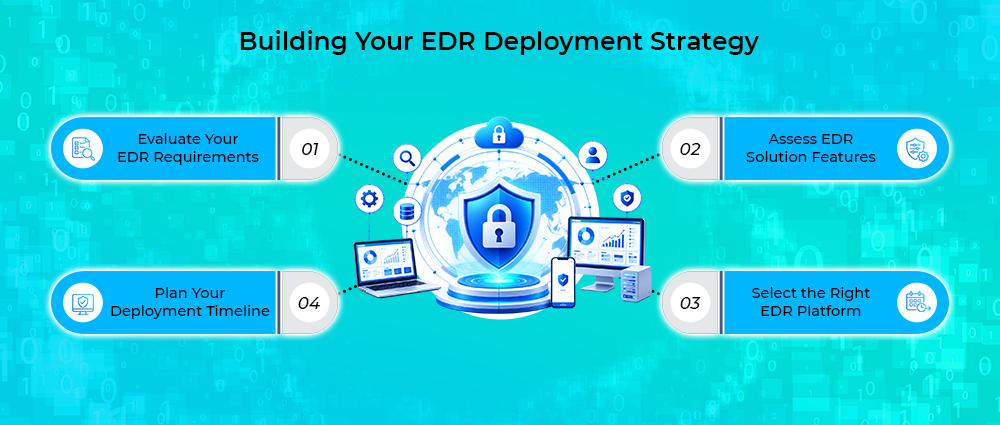
Evaluate Your EDR Requirements
Begin by identifying the endpoint detection and response capabilities your organization needs. Think about these factors:
- The number of endpoints in your environment.
- Compliance requirements for your industry.
- Current security tools you have.
- The technical skills of your team.
Write down these requirements. This will help guide all your future decisions about implementing endpoint detection and response across your organization.
Assess EDR Solution Features
Endpoint detection and response solutions offer different capabilities. Use these points to find the right one for your needs.
- Look for behavior-based detection that can identify suspicious activity and use threat intelligence to improve accuracy.
- Check if the solution can automatically isolate infected devices and stop malicious processes.
- Make sure your team can search for events, track attacks, and investigate threats thoroughly.
- Make sure the platform works with your existing security tools, whether through SIEM integrations, APIs, or other connectors.
- Consider whether a cloud-based or on-premises deployment is the better fit for your infrastructure and compliance requirements.
- Before making a final decision, ask the vendor for a proof-of-concept or trial so you can evaluate the solution in your own environment.
Your endpoint detection and response solution must work within your existing infrastructure, not against it.
Select the Right EDR Platform
Your endpoint detection and response selection should balance three factors: capability, integration fit, and team expertise. A highly capable endpoint detection and response platform that your team cannot operate effectively is worse than a simpler solution they can master quickly. Similarly, endpoint detection and response tools that do not integrate cleanly with your SIEM or security orchestration platform create manual work and reduce effectiveness.
Involve your security operations and IT infrastructure teams in the selection process. Their input on endpoint detection and response integration and operational requirements is invaluable.
Plan Your Deployment Timeline
A 90-day plan for implementing endpoint detection and response has four phases:
- Planning and selection (weeks 1-2)
- Preparation (weeks 3-4)
- Deployment and integration (weeks 5-8)
- Optimization and threat hunting (weeks 9-12)
Define your endpoint detection and response timeline with specific milestones and assign owners. Include buffer time for unexpected problems. This helps your organization avoid premature deployment.
Preparation for Deployment
Success in endpoint detection and response implementation depends on thorough preparation before the first agent is installed.
Assess Your IT Infrastructure
Review your current IT environment to determine whether it is ready for endpoint detection and response deployment. As part of this assessment, gather the following information:
- An inventory of all endpoints, including workstations, servers, laptops, and virtual machines.
- The operating systems and versions running across your environment.
- Details of the endpoint protection solutions currently in use.
- An overview of your network architecture, including key segments and connected systems.
- List any legacy systems that might have compatibility issues.
- Assess your network’s bandwidth capacity for handling EDR telemetry volume.
This infrastructure assessment reveals potential roadblocks to your endpoint detection and response deployment before they become problems.
Build Your EDR Deployment Team
Assign clear ownership and accountability for your endpoint detection and response implementation. You need team members from the following groups:
- IT operations will manage the deployment of agents and endpoints.
- Security operations will set up detection rules and handle threat responses.
- Network operations will assist with integrating security tools and the network.
- Management will provide resources and address issues that need higher-level attention.
Prepare Your Endpoint Devices
Before you install EDR agents, get your devices ready by doing the following:
- Install the latest operating system updates.
- Update any firmware.
- Uninstall old software that is no longer needed.
- Turn off any security programs that won’t work with the EDR agents.
- Inform users about the EDR agent installation: Explain what EDR agents are, why we are using them, and how they will affect user experience.
This communication will help reduce support requests and make the rollout of endpoint detection and response smoother.
Define Resource Requirements
Before deployment begins, determine the infrastructure, licensing, and staffing needed to support your endpoint detection and response solution. Consider:
- EDR licenses for each endpoint.
- Server resources to run your EDR console.
- Storage space for keeping EDR data.
- Time needed for deployment, setup, and ongoing management.
Include these resources in your budget before starting the project. EDR systems that lack proper funding are more likely to fail.
Establish Success Metrics
Use the following metrics to evaluate the progress and performance of your endpoint detection and response deployment:
- Agent deployment completion rate (target: 95% within 30 days)
- Mean time to detect (MTTD) for known threat patterns
- Mean time to respond (MTTR)
- Percentage of threats detected by endpoint detection and response compared with other security tools
- User satisfaction score
Executing EDR Implementation
With preparation complete, the actual execution phase begins. This is where your endpoint detection and response solution moves from planning to operation.
Develop Your Implementation Strategy
Your endpoint detection and response pilot should include the following:
- Deploy the solution to 50 to 100 non-critical devices to validate installation, confirm configurations, and test integrations.
- Use the pilot phase to identify and resolve any deployment or compatibility issues before expanding further.
- Allow two to three weeks to complete testing and evaluate the results.
- Once the pilot is successful, roll out the solution to the remaining devices in planned deployment waves.
Define Deployment Scope
Structure your deployment in the following priority order:
Phase 1: Servers and high-value workstations.
Phase 2: Standard user endpoints.
Phase 3: Non-networked systems.
For each phase, give IT operations a clear list of which devices to deploy to, when to deploy them, and what success looks like. Ongoing communication keeps the project organized and helps maintain momentum throughout the implementation.
Integrate with Your Security Stack
Integrate your endpoint detection and response solution with the security tools already deployed in your environment:
- Send alerts and EDR data to your SIEM.
- Connect to your firewall for coordinated response actions.
- Link to your vulnerability management system to match endpoint detection and response findings with known vulnerabilities
This integration helps all your security tools work together and improves your overall protection.
Build Team Expertise
Your security team needs training for endpoint detection and response to work effectively. Conduct hands-on training for your SOC analysts on interpreting alerts, hunting threats, investigating incidents, and configuring responses.
Along with vendor training, develop internal documentation that reflects your own environment and processes. Runbooks and a dedicated endpoint detection and response lead can help your team use the platform more effectively.
Execute Change Management
Change management is often overlooked but critical to endpoint detection and response success. Beyond technical preparation, you need user and stakeholder buy-in.
Keep end users informed about the value of endpoint detection and response protection through regular communication. Explain that endpoint detection and response agents are necessary for security and will not significantly impact performance. Set expectations about the endpoint detection and response deployment timeline.
Unexpected issues can occur during deployment. When they do, share timely updates with users and address problems promptly to minimize disruption.
Monitor Performance Continuously
From day one of agent deployment, monitor endpoint detection and response agent performance by tracking:
- Agent connectivity
- Alert volume
- False positive rates
- System performance impact
Most endpoint detection and response agents have a low impact on system performance when deployed correctly. If performance issues appear, review the configuration and make the necessary adjustments.
Refine and Optimize
Once your endpoint detection and response solution is in place, spend time reviewing how it performs in your environment. Improve detection rules, adjust alert thresholds where necessary, and update agent settings if you notice performance issues. Check your deployment progress each week and make changes when needed.
Integrating EDR with Security Tools and SIEM
Connecting endpoint detection and response with your other security tools helps your team detect and respond to threats more effectively.
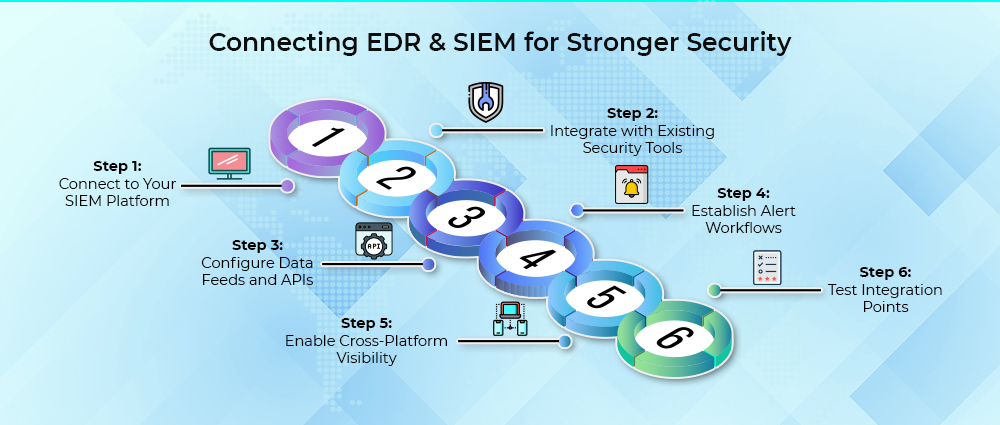
Step 1: Connect to Your SIEM Platform
Connect your endpoint detection and response solution to your SIEM platform so alerts and endpoint data can be viewed alongside network events, application logs, and other security information. Having this data in one place makes it easier for your security team to investigate threats and respond without delay.
Step 2: Integrate with Existing Security Tools
Use your firewall, vulnerability management, and identity and access management tools along with your endpoint detection and response platform. This helps your security team gather more information when investigating alerts. For example, they can block suspicious network activity, prioritize vulnerable devices, or compare unusual login attempts with endpoint activity.
Step 3: Configure Data Feeds and APIs
Keep your endpoint detection and response platform updated by adding the latest threat intelligence feeds. These feeds include current threat indicators. Use APIs to share EDR data with your SIEM or security orchestration platform. This will help you automate actions when necessary.
Step 4: Establish Alert Workflows
Not every endpoint detection and response alert needs the same response. An affected device, for example, may be isolated automatically, while a more complex alert may require an analyst to investigate what happened. Set up the workflow so each alert reaches the right person with the information needed to handle it.
Step 5: Enable Cross-Platform Visibility
Bring endpoint detection and response data together with network traffic, application activity, and user activity from your other security tools. Reviewing these sources together gives your team better context when investigating suspicious activity and makes it easier to understand how an incident is developing.
Step 6: Test Integration Points
Make sure your security tools are working together as expected before going live. Send test alerts to the SIEM, check the API connections, and run a few sample incidents from start to finish. Fix any problems you find during testing before using the system regularly.
Common Challenges in EDR Implementation and How to Overcome Them
Endpoint detection and response deployment can come with a few practical challenges. Understanding these problems can help your team respond when they occur.
Managing Endpoint Performance Impact:
Challenges:
- Poorly configured agents can slow down endpoint performance.
- High CPU or memory usage can affect how devices run.
- The agent needs to stay active to provide continuous protection.
Solutions:
- Choose an endpoint detection and response solution that uses system resources efficiently.
- Adjust the agent settings to suit your environment.
- Run resource-heavy EDR tasks during periods of low activity.
- Share clear information about any performance impact with stakeholders.
Handling Integration Complexities
Challenges:
- Multiple security tools using different data formats or APIs
- Direct integration difficulty between systems
Solutions:
- Begin with the integrations that matter most for security, such as your SIEM and firewall.
- Use middleware or security orchestration tools to bring data into a common format.
- Add integrations one at a time instead of trying to set them all up at once.
Addressing Skill Gaps in Security Teams
Challenges:
- EDR requires skills that go beyond traditional endpoint protection.
- Teams may not have enough experience with process analysis, threat hunting, and incident response.
- These skills can be difficult to find in teams using EDR for the first time.
Solutions:
- Conduct vendor training and hands-on exercises.
- Share threat intelligence internally.
- Hire experienced SOC analysts if budget allows.
- Invest in team capability development.
Dealing with Alert Fatigue
Challenges:
- Excessive false positive alerts in immature deployments.
- Hundreds of alerts daily from improperly tuned detection rules.
Solutions:
- Provide training in the areas where your team needs more experience.
- Use hands-on exercises to build threat hunting and incident response skills.
- Consider outside expertise if your team does not have the required skills.
- Give team members time to build practical experience with EDR.
Ensuring User Adoption and Compliance
Challenges:
- End users view EDR as an obstacle to work.
- Concerns about compliance overhead and monitoring scope.
Solutions:
- Help users understand the role of endpoint detection and response in protecting their devices.
- Clearly explain the type of activity the EDR agent monitors.
- Monitor resource usage and address performance issues early.
- Configure EDR to run in the background with as little disruption as possible.
Balancing Cost and ROI
Challenges:
- High investment in licenses, infrastructure, and personnel.
- ROI questions during initial 90-day period.
Solutions:
- Expand the EDR deployment gradually as your team gains experience.
- Train your security team to carry out regular threat hunting.
- Build and maintain a set of detection rules that work well in your environment.
- Compare the cost of EDR with the potential cost of a security breach.
- Treat endpoint detection and response as an important part of your overall security strategy.
Future Trends in EDR
The endpoint detection and response landscape continues to evolve. Understanding emerging trends helps you plan for the long term.
AI-Powered Threat Detection
Machine learning can analyze endpoint behavior and flag patterns that look suspicious, even when there is no known signature for the threat. This gives security teams another way to detect new attack methods and zero-day threats.
Cloud-Native EDR Solutions
More EDR platforms are moving towards cloud-based models as organizations manage devices across different locations and environments. Centralized management, automatic updates, and easier scaling can make these platforms simpler to maintain as an organization grows.
Extended Detection and Response (XDR)
Security teams are increasingly looking beyond endpoint activity when investigating an attack. XDR brings together data from endpoints, networks, cloud workloads, email, and applications, making it easier to link related events and trace attacks across different systems.
Behavioral Analytics and Anomaly Detection
Future EDR platforms are likely to rely more heavily on behavioral analysis to identify activity that falls outside normal patterns. By learning how users and devices typically behave, these systems can flag unusual activity even when there is no known signature to match it.
Automation in Incident Response
More response tasks are likely to be handled automatically as EDR platforms become more advanced. Actions such as isolating a device, collecting forensic data, notifying the right team, and updating threat intelligence could be triggered automatically when certain conditions are met.
Zero Trust Integration
EDR is also expected to work more closely with Zero Trust security models. Security teams can use endpoint health, device activity, and user behavior as part of ongoing access decisions, helping them respond when a device or user no longer meets security requirements.
Conclusion
A successful 90-day EDR deployment comes down to planning, testing, and taking the rollout one stage at a time. Choose a solution that fits your environment, prepare your team and systems, start with a pilot, and expand once everything is working as expected. From there, you can build stronger threat hunting and automated response capabilities.
AMSAT’s Experts have helped organizations in healthcare, finance, and technology deploy endpoint detection and response. We can help with the technical setup, team requirements, and day-to-day challenges involved in the rollout, so you can avoid common mistakes and get your EDR program running sooner.
Ready to strengthen your threat detection capabilities? Contact AMSAT today to discuss your endpoint detection and response implementation strategy.
Frequently Asked Questions