Every login, API call, system update, and security alert creates a log. As businesses move to the cloud, support remote work, and use more connected devices, the number of logs increases. Without a clear way to manage them, important issues and security risks can go unnoticed. Log management collects all these logs in one place, making it easier for IT and security teams to monitor systems, identify problems, and respond to incidents faster.
The scale of this challenge keeps growing. According to Mordor Intelligence’s SIEM market report, organizations with more than 10,000 employees now ingest over 10 terabytes of log data every day. Yet many enterprises are still relying on scattered, outdated logging tools built for a fraction of that volume. The systems designed to track thousands of daily events are being asked to handle billions.
During an outage or security investigation, teams often need to check logs from several different systems. That process can be slow when the data is scattered across servers, applications, and cloud platforms. With log management, those records are available in one place, making it much easier to understand what happened and take the next step.
As the amount of log data increases, keeping track of it becomes a challenge in itself. Most organizations have logs stored across servers, applications, cloud services, and network devices, which can slow investigations when every minute matters. Log management brings this information together, helping IT and security teams make sense of events and respond with confidence.
Centralizing log data is only the beginning. The real challenge is turning millions of records into information that teams can actually use. A well-designed log management process makes that possible by keeping log data organized, searchable, and ready whenever it’s needed.
What You’ll Learn
- Understand the role of log management in modern IT and security operations.
- Explore the different types of logs and where they come from.
- Learn why centralizing logs makes monitoring and incident investigations easier.
- The complete log management lifecycle.
- Common challenges enterprises face when handling billions of security events.
- Best practices for managing logs securely and efficiently.
- The differences between log management and SIEM.
- The key features to look for in a scalable log management solution.
- How emerging technologies like AI are shaping the future of enterprise logging.
Key Insights
- As organizations grow, the amount of log data grows with them. Managing that data effectively is essential for maintaining visibility across the IT environment.
- Bringing logs into one central location makes it easier to investigate incidents, troubleshoot system issues, and keep track of day-to-day activity.
- Large enterprises often rely on automation to process millions of events, helping security teams focus on the alerts that need immediate attention.
- An effective log management strategy doesn’t stop at collecting logs. It also covers storage, monitoring, analysis, and retention, ensuring the data remains useful over time.
- Log management and SIEM work together but serve different purposes. One focuses on collecting and organizing log data, while the other builds on that information to detect and respond to security threats.
- When choosing a solution, look beyond current requirements. A platform that can scale with your business will be better equipped to handle increasing log volumes and changing security needs.
What is Log Management
Every system, application, and network device generates logs as it operates. Log management is the process of collecting those logs, keeping them organized, and making them easy to search whenever they’re needed. This allows IT and security teams to understand what’s happening across their environment without having to check multiple systems individually.
In many organizations, log data isn’t stored in one location. Different applications, servers, and cloud services keep their own records, forcing teams to search multiple systems when investigating an issue. With log management, these logs are collected centrally, making them easier to access, review, and analyze.
Logs are generated by almost every part of an IT environment, including:
- User authentication and login attempts
- Applications and software services
- Databases
- Firewalls and security appliances
- Network devices
- Operating systems
- APIs
- Cloud platforms
Looking at one log in isolation doesn’t reveal much. The bigger picture only starts to emerge when related logs are reviewed together, allowing teams to trace events, understand what happened, and investigate the cause of an issue.
A well-designed log management system enables organizations to process millions or even billions of events without overwhelming their IT teams. It also supports faster investigations by allowing teams to search historical logs from a single dashboard rather than logging into multiple devices.
Key Components of Log Management
Although every organization has different requirements, most enterprise environments follow the same core workflow.
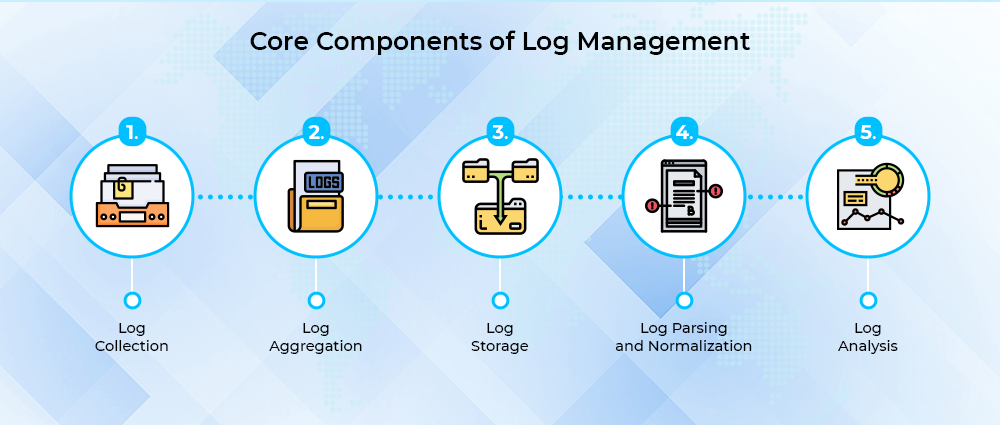
Log Collection
The first step involves collecting logs from multiple sources, including:
- Physical servers
- Virtual machines
- Cloud platforms
- Containers
- Business applications
- Firewalls
- Routers
- Endpoint devices
- Security appliances
Instead of collecting logs manually, organizations use agents or APIs to pull data from different systems and send it to a central location.
Log Aggregation
Large IT environments often store logs in a wide range of different systems. During an investigation, switching between servers, applications, and cloud platforms takes time. When these logs are collected in a single place, teams get a clearer picture of events and can investigate issues faster.
Log Storage
Keeping logs isn’t just about saving data. Teams also need to make sure the information remains easy to search whenever an issue or investigation comes up. The amount of time logs are stored varies from one organization to another and usually depends on:
- Industry regulations
- Internal policies
- Business requirements
- Storage costs
Logs linked to security events are generally retained for longer than routine system records.
Log Parsing and Normalization
Logs collected from different systems often look very different from one another. Standardizing them into a common format makes the data easier to work with and avoids confusion during investigations.
Instead of dealing with multiple log formats, teams can search and compare events using the same structure.
Log Analysis
Once normalized, logs can be analyzed to identify:
- Failed login attempts
- Suspicious user behavior
- Malware activity
- Configuration changes
- Performance bottlenecks
- System failures
The goal is to understand what the logs are showing and decide whether the activity is expected or needs attention.
Types of Logs
Not all logs record the same type of information. Different systems generate different logs depending on the events taking place, and each one helps IT and security teams monitor a specific part of the environment.
System Logs
Operating systems generate logs throughout the day to record important events. These logs can show when a system starts or shuts down, when software is installed, or when hardware and system errors occur.
Application Logs
Application logs become especially useful when something is not working as expected. Instead of guessing what went wrong, developers can review these records to see what happened before an error occurred and identify the source of the problem.
Security Logs
When a security issue is suspected, security log management becomes the first place analysts turn. By reviewing these records, teams can track login attempts, permission changes, firewall events, and other activities to identify suspicious behavior and understand what happened.
Network Logs
A large amount of network activity takes place every minute, and network logs keep track of it. By reviewing these records, IT teams can understand how traffic is moving and investigate anything that appears unusual.
Database Logs
Many database issues can only be understood by looking at the logs. These records show how the database has been used, including queries that were run, updates that were made, failed transactions, and changes to user permissions.
Cloud Logs
In cloud environments, log data is often spread across different services and platforms, which is where cloud log management comes in. Keeping these records in one place saves time during monitoring and investigations.
What is a Log File
A log file stores information about events that take place within a system or application. The exact details vary depending on the software or device, but most log files contain information such as:
- Timestamp.
- Event type.
- Source device.
- Username.
- IP address.
- Status code.
- Event description.
To see how this works, consider an employee signing in to a company application. The log file might contain information such as:
Login Time → User ID → Device Information → Geographic Location → Authentication Result
While a single log file may appear simple, thousands of systems produce millions of entries. To see how this works, consider an employee signing in to a company application. The log file might contain information such as: every day, it creates a massive volume of operational data.
Without effective log management, finding a single security incident within billions of records becomes extremely difficult.
What is Centralized Log Management?
Modern enterprises rarely operate from a single office or data center. Instead, they manage workloads across:
- On-premises infrastructure
- Public cloud platforms
- Private clouds
- Remote offices
- SaaS applications
- Edge devices
Keeping logs on individual systems creates visibility gaps and slows investigations.
Centralized log management addresses this challenge by collecting logs from every environment into one searchable platform.
With all log data stored in one place, IT teams no longer need to switch between servers, applications, and cloud services during an investigation. They can search, filter, and review events from one dashboard, reducing the time it takes to troubleshoot issues and respond to incidents.
Once logs are available in one location, everyday IT operations become easier. Some of the biggest improvements include:
- Respond to incidents more quickly.
- Simplify compliance reporting.
- Troubleshoot issues with less effort.
- Improve visibility across systems.
- Reduce day-to-day administrative work.
- Help IT and security teams work from the same information.
Keeping logs together also makes it easier to connect related events across different systems. Rather than reviewing each log on its own, teams can see how individual events tie together and form a fuller picture of what happened.
Steps for the Log Management Process
Log data passes through several stages before it can be used for monitoring, troubleshooting, or security investigations. Each step plays a part in making the information easier to manage.
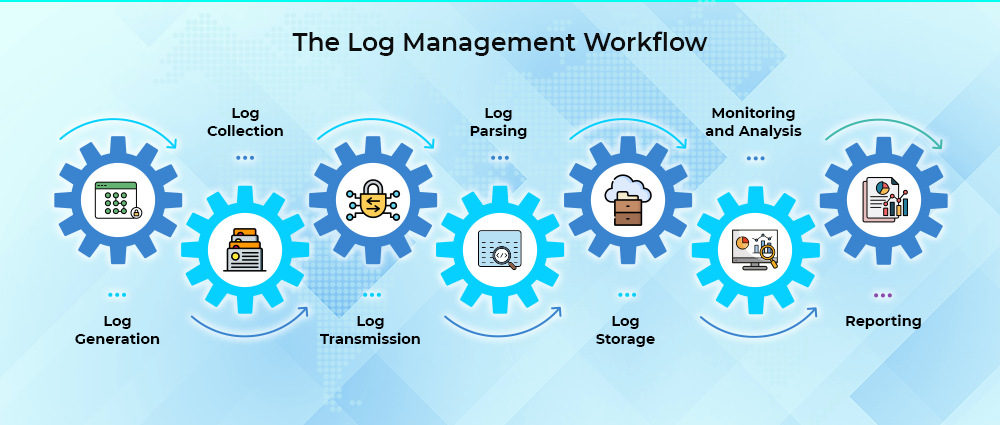
Log Generation
As systems perform their normal operations, they automatically generate log data. Applications, servers, databases, endpoints, cloud services, and network devices all record events that help track what is happening across the system.
Log Collection
Once created, the logs are gathered from different systems using collection agents or APIs. Bringing them together early helps prevent important records from being missed.
Log Transmission
The collected logs are then sent to a central platform where they can be stored and reviewed. Most organizations encrypt this data while it’s being transferred to protect sensitive information.
Log Parsing
Logs collected from different systems are normalized into a consistent format before they are analyzed. This ensures that security teams can search and review data without dealing with different log structures.
Log Storage
Processed logs are stored in line with the organization’s data retention policy. Newer records remain available for quick access, while older logs are securely archived.
Monitoring and Analysis
The stored logs are then reviewed to identify errors, suspicious activity, and other signs of security risks. Automated alerts help notify IT and security teams when critical events occur.
Reporting
The final step is turning log data into reports that support different business and operational needs, including:
- Compliance audits.
- Security investigations.
- Performance monitoring.
- Capacity planning.
- Executive reporting.
Role of Log Management in IT Operations
There is more to log management than cybersecurity. It also helps organizations run stable, efficient IT operations by giving teams a clear picture of system activity through log management software, one that makes identifying, investigating, and resolving issues much easier.
Whether an application is slowing down or running without any obvious issues, logs offer valuable insight into system activity that helps IT teams investigate issues faster, and regular reviews can identify patterns such as recurring errors or increasing storage usage before they impact users.
Catching these issues early means fewer major disruptions down the road. Rather than scrambling to react once users are already affected, teams can fix small problems while they are still small.
This approach brings several operational benefits:
- Reduces mean time to detect (MTTD) incidents.
- Speeds up mean time to resolve (MTTR) issues.
- Improves application availability.
- Supports better infrastructure planning.
- Makes root cause analysis easier.
- Increases visibility across hybrid environments.
As enterprises keep expanding their digital infrastructure, log data has turned into one of the most valuable assets IT teams have. Managing it well helps organizations run more reliably, stay more secure, and make better-informed decisions.
Log Management Challenges Faced by Enterprises
Modern businesses use many different systems, including cloud platforms, applications, endpoints, IoT devices, and security tools. All of them generate logs every day, and together they can create billions of records. As the amount of data grows, it becomes harder for IT teams to find important events. Without a proper log management strategy, security threats can easily be missed.
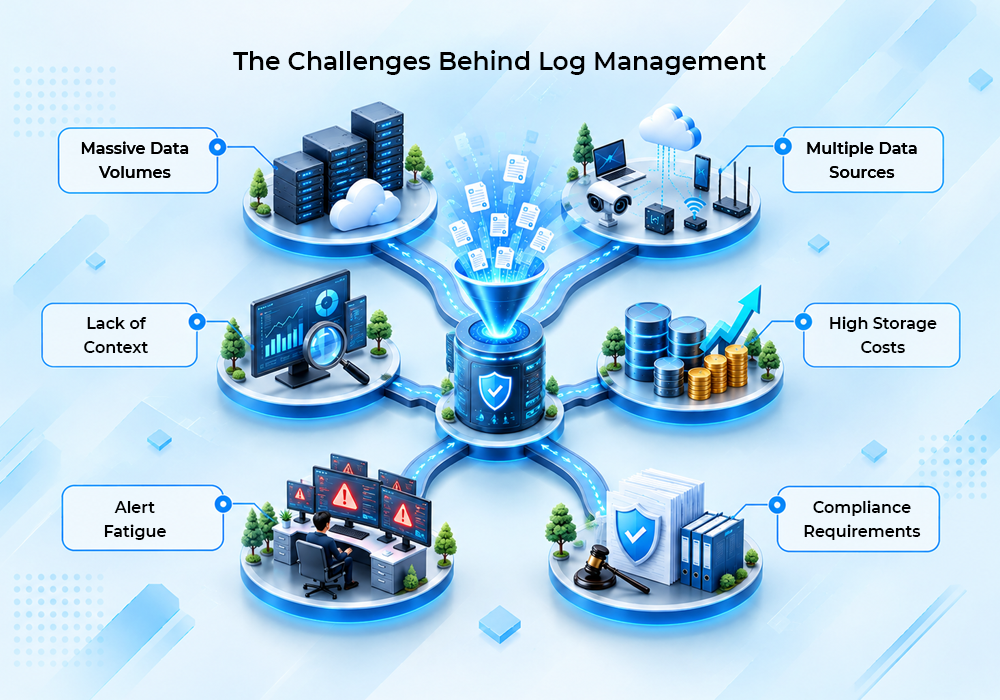
Below are some of the most common challenges enterprises face.
Massive Data Volumes
Every application, server, firewall, and endpoint continuously produces new log entries. Large organizations can generate terabytes of log data daily, making storage and processing increasingly expensive.
The challenge is not just collecting logs. Organizations also need to decide which logs should be kept, stored for later, or removed while still meeting compliance requirements.
Multiple Data Sources
Enterprise environments rarely rely on a single platform. Most organizations operate across:
- On-premises data centers.
- Public cloud services.
- Hybrid cloud environments.
- SaaS applications.
- Mobile devices.
- Remote workstations.
- Network infrastructure.
Each system creates logs differently, so it can be difficult to review all the data in the same way.
Lack of Context
A single log entry does not always show the full picture. Events that seem normal on their own can point to a security issue when viewed together.
For example:
- A failed login attempt may not seem unusual.
- A password reset may look like a normal user action.
- A successful login from another country could go unnoticed.
However, when correlated, these events may indicate a compromised account.
This is why log management and analysis have become increasingly important for modern security operations.
High Storage Costs
Many industries require organizations to retain logs for months or even years to satisfy regulatory requirements.
Keeping logs for long periods means organizations have to think about:
- How much storage they need.
- How quickly logs can be accessed.
- Meeting compliance requirements.
- Protecting the integrity of the data.
Without proper planning, storage costs can increase over time.
Alert Fatigue
Not every log represents a security threat.
Poorly configured systems may generate thousands of alerts each day, forcing analysts to investigate harmless events while genuine attacks remain hidden.
Reducing false positives remains one of the biggest priorities for security teams.
Compliance Requirements
Many organizations are required to keep audit logs as part of industry regulations. This is common in sectors like healthcare, finance, and government, where standards such as ISO 27001, SOC 2, HIPAA, and GDPR require proper logging and monitoring. Without reliable logs, passing an audit becomes much more difficult.
This is why having a clear log management process is just as important as collecting the logs themselves.
Log Management Best Practices
Implementing log management best practices helps organizations improve visibility, reduce operational complexity, and strengthen their cybersecurity posture.
Collect Only Meaningful Data
There is no need to keep every log forever. Store the logs that are most important, such as:
- Authentication events.
- Administrative actions.
- System errors.
- Network activity.
- Configuration changes.
- Security incidents.
This keeps log data organized and easier to work with.
Centralize Log Collection
Maintaining logs across hundreds of independent systems creates operational inefficiencies.
A central log management system helps by making it easier to:
- Search logs faster.
- Improve visibility.
- Simplify investigations.
- Standardize monitoring.
- Support compliance reporting.
Standardize Log Formats
Logs from different applications and devices often come in different formats. Standardizing them makes analysis easier and helps security teams work with all the data in a consistent way. It also improves reporting.
Define Retention Policies
Log retention periods should be based on:
- Regulatory requirements.
- Internal policies.
- Business objectives.
- Investigation needs.
Recent logs can stay in fast storage for easy access, while older logs can be moved to long-term storage.
Automate Alerting
Most log management tools can send alerts when specific events occur. Common examples include:
- Multiple failed login attempts.
- Privilege escalation.
- Unexpected administrator activity.
- Malware detections.
- Large data transfers.
With automatic alerts in place, security teams can respond faster instead of manually checking logs throughout the day.
Secure Log Integrity
Logs often serve as important evidence during forensic investigations. To keep them reliable, they should be protected from:
- Unauthorized modification
- Deletion
- Corruption
- Insider threats
Encryption and role-based access controls help keep log data secure and prevent unauthorized changes.
Review Logs Regularly
Collecting logs without reviewing them provides little value.
Security and IT teams should regularly analyze trends to identify:
- Recurring system failures
- Performance bottlenecks
- Suspicious behaviour
- Configuration errors
- Emerging threats
Log Management vs SIEM
Many organizations assume log management and SIEM perform the same function. Although they’re often mentioned together, they have distinct functions.
| Log Management | SIEM |
| Collects and stores logs | Collects logs and performs advanced threat detection |
| Focuses on storage, organization, and search | Focuses on security monitoring and incident detection |
| Supports troubleshooting and compliance | Supports Security Operations Centers (SOCs) |
| Lower implementation complexity | More advanced deployment and maintenance |
| Used by IT and security teams | Primarily used by cybersecurity analysts |
Think of SIEM log management as one capability within a larger SIEM platform.
A SIEM typically builds upon a strong log management system by adding:
- Event correlation
- Threat intelligence
- Behavioural analytics
- Security orchestration
- Automated incident response
Businesses often begin with enterprise log management before expanding into SIEM as their security requirements mature.
Benefits of Log Management
A well-implemented log management strategy provides value far beyond cybersecurity.
Improved Threat Detection
When all logs are available in one place, security teams can detect suspicious activity more quickly and respond before it affects more systems.
Faster Incident Response
A central log repository makes investigations much simpler. Rather than checking several systems, investigators can find the required logs in one place, saving time and reducing downtime.
Better Regulatory Compliance
Logs give auditors a complete history of important system activities, including user actions, access permissions, system changes, security events, and administrative tasks.
Improved System Performance
Logs give IT teams visibility into recurring application errors, hardware problems, and resource bottlenecks. Catching these early helps systems run more smoothly.
Simplified Troubleshooting
Keeping all logs in one place makes troubleshooting much easier. IT teams can quickly review past events, find what caused the problem, and get systems running again sooner.
Greater Operational Visibility
Dashboards and reports give executives, IT managers, and security teams an easy way to see how their systems are performing and identify issues that need attention.
Supports Business Continuity
Reliable logging improves disaster recovery planning by documenting system activity before, during, and after incidents.
What Features Should Your Log Management Solution Include?
Choosing the right platform requires more than simply comparing prices.
The best log management solutions should support both current requirements and future growth.
Look for features such as:
Scalable Data Collection
As organizations grow, the amount of log data increases as well. A good platform should be able to handle millions of events without slowing down or affecting performance.
Real-Time Monitoring
Real-time monitoring helps security teams detect unusual activity as it happens. Instant alerts make it easier to investigate and respond before issues become more serious.
Advanced Search
Finding the right log should not take hours. Fast search tools help teams quickly locate the information they need during troubleshooting and security investigations.
Flexible Dashboards
Dashboards bring important log data into one place, making it easier to monitor system activity, identify trends, and share insights with both technical and non-technical teams.
Compliance Reporting
Preparing for an audit is much easier when reports are readily available. Look for platforms that support standards such as:
- ISO 27001
- HIPAA
- GDPR
- SOC 2
Cloud Compatibility
Many organizations now run workloads across cloud and on-premises environments. A log management platform should work smoothly with major cloud providers and hybrid infrastructures.
API Integrations
Log management tools work best when they connect with other security and IT systems, including:
- SIEM platforms.
- Endpoint Detection and Response.
- Ticketing systems.
- Threat intelligence feeds.
- DevOps tools.
Bringing these systems together helps teams respond to issues more quickly and work more efficiently.
Role-Based Access Controls
Not everyone needs access to every log. Role-based permissions help protect sensitive data by limiting access to authorized users.
Long-Term Storage
Some logs need to be kept for months or even years. Flexible storage options make it easier to retain older data while keeping recent logs easy to access.
Future of Log Management
The way organizations manage logs has changed a lot over the past few years. More applications now run in the cloud, many businesses use Kubernetes and serverless services, and IT environments are spread across multiple platforms. All of this creates far more log data than traditional tools were designed to handle.
Security teams are also changing how they approach event log management. Instead of spending hours sorting through alerts, many are now utilizing AI to filter out routine events and highlight unusual activities. This helps analysts concentrate their efforts on the areas that require their attention the most.
Logs are no longer the only source of information. Many organizations now review them alongside metrics, traces, and application performance data to get a better picture of what is happening across their systems. Looking at everything together often makes troubleshooting much easier.
Collecting data from different platforms has become simpler as well. Open standards like OpenTelemetry help organizations gather telemetry data from cloud services, applications, and infrastructure without using a different collection method for every system.
None of these changes remove the need for good log management. They simply change what organizations expect from it. Modern platforms need to handle larger amounts of data, work across different environments, and help teams find useful information without adding extra complexity.
As IT environments continue to grow, the role of log management will keep expanding. Organizations that invest in practical, scalable solutions today will find it much easier to monitor systems, investigate issues, and support future growth.
Conclusion
Modern enterprises generate an enormous amount of machine data every second. Without an effective log management strategy, identifying critical security incidents, diagnosing system failures, or meeting compliance requirements becomes increasingly difficult.
When logs are collected, monitored, and analyzed in one platform, IT teams can find issues more rapidly and make better decisions based on accurate information.
As cloud adoption, AI-driven applications, and distributed infrastructures continue to grow, investing in scalable log management capabilities is no longer optional; it’s a critical component of modern cybersecurity and IT operations.
If your organization is looking to strengthen its security posture with scalable monitoring, intelligent analytics, and enterprise-grade infrastructure, our cybersecurity services can help. Contact the Amsat team to discuss your requirements with our experts.
Frequently Asked Questions