
Cyberattacks do not always start with an obvious breach. Attackers may begin by scanning a network, looking for exposed services, trying stolen credentials, or testing system weaknesses. This is why security teams need ways to identify suspicious activity early and understand what attackers are looking for. Honeypots are one method to help with this. They create a safe environment that encourages attackers, allowing security teams to observe their actions.
According to Verizon’s 2026 Data Breach Investigations Report, 31% of breaches involved vulnerability exploitation. A vulnerable system can give attackers an opportunity to gain access and carry out further attacks. Security teams therefore need to understand what attackers look for and how they try to exploit it. Honeypots provide a controlled target where these actions can be monitored.
Key Insights
- A honeypot is a fake target designed to attract and monitor attackers.
- Honeynets connect multiple honeypots to simulate a larger network.
- Honeypots can detect suspicious activity and provide valuable threat intelligence.
- Different types of honeypots support different security and research objectives.
- Secure isolation is essential to prevent a compromised honeypot from becoming a security risk.
- Honeypots support security controls such as firewalls, EDR, SIEM, and XDR rather than replacing them.
What We Will Cover
- Understand what a honeypot is and how it is used in cybersecurity.
- Explore what a honeynet is and how it differs from a single honeypot.
- Learn how honeypots work and how they help security teams monitor suspicious activity.
- Explore the different types of honeypots.
- Understand the benefits of using honeypots.
- Examine the common challenges organizations may face when deploying honeypots.
- Compare a honeypot and a honeynet to understand how each works within a security environment.
What Is a Honeypot?
A honeypot is a simulated system, service, application, or digital asset designed to attract attackers and monitor their activity. It looks like a legitimate target, so an attacker may interact with it instead of reaching a real business system. This makes a honeypot useful for detecting suspicious activity and learning how attackers find systems to exploit.
The basic honeypot meaning is a controlled trap that allows security teams to observe and analyze suspicious behavior. A honeypot can replicate servers, databases, applications, network services, endpoints, or other assets that attackers commonly target. It should be separated from actual business systems so that any activity within the fake target can be monitored safely.
A honeypot normally receives little or no legitimate user activity, which makes unusual interactions easier to notice. This makes unexpected access attempts easier to identify and investigate. Security teams can collect information such as IP addresses, commands, malware, login attempts, files, and attack techniques, and use the information to detect similar threats, investigate threats, and identify weaknesses in their security environment.
What Is a Honeynet?
A honeynet is a network of connected honeypots designed to look like a larger and more realistic IT environment. Instead of using one decoy system, it can include multiple simulated systems, services, servers, databases, and other assets that attackers may target.
The main difference between a honeypot and a honeynet is their scale and complexity. A single honeypot focuses on attracting and monitoring activity around one controlled system. At the same time, a honeynet can provide a broader view of how an attacker explores and interacts with multiple systems within a simulated environment.
A honeynet lets security teams observe attacker activity across multiple simulated systems and learn more about the techniques being used. It also needs careful planning, monitoring, and maintenance to keep the environment secure and separate from real business systems.
How Does a Honeypot Work?
The effectiveness of honeypots depends on creating a realistic target, keeping it separate from real systems, and monitoring every interaction. Here are the main steps involved.
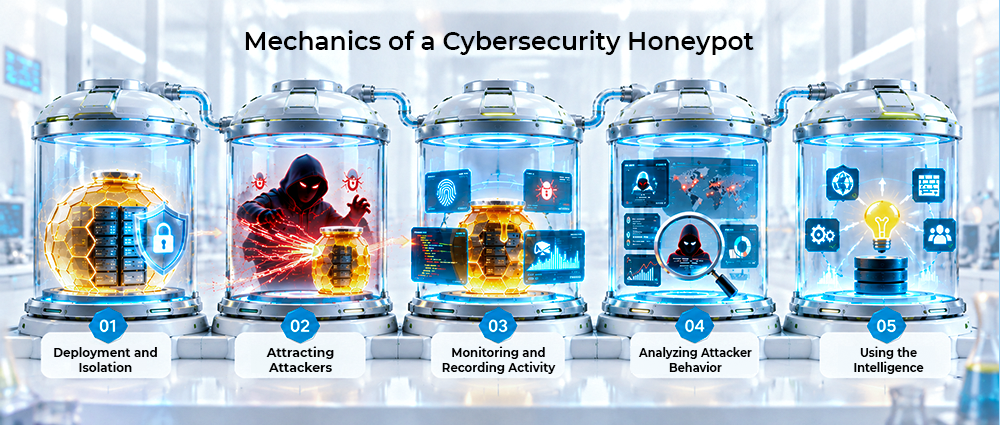
Step 1: Deployment and Isolation
The first step is to deploy the honeypot in a controlled and isolated environment so attackers cannot use it to reach core systems.
- Use network segmentation to separate the honeypot from critical business systems.
- Set access rules to control incoming and outgoing connections to the simulated environment.
- Place the honeypot in a virtual machine or isolated environment to limit the impact of a compromise.
- Configure realistic services, applications, and information so the environment appears more like a real system to attackers.
Step 2: Attracting Attackers
The next step is to make the honeypot look like a useful target that encourages attackers to interact with it.
- Expose simulated services, applications, or network ports that attackers may find interesting.
- Create fake accounts, credentials, or files that appear valuable but contain no actual data.
- Use attractive targets such as a fake database or administrative application to encourage attackers to attempt access or exploitation.
Step 3: Monitoring and Recording Activity
Once an attacker interacts with the honeypot, security teams monitor and record their actions to understand what is happening inside the environment.
- Record connection attempts, login attempts, commands, and file access.
- Collect indicators such as IP addresses, malware, domains, and other suspicious activity.
- Monitor attacker interactions to identify possible reconnaissance, exploitation, or unauthorized access.
- Use the collected information to support threat intelligence, detection, and security investigations.
Step 4: Analyzing Attacker Behavior
Security teams can review the collected data to see what the attacker did, what they were looking for, and which techniques they used.
- Check which tools and commands the attacker used and how they carried out the attack.
- Identify the vulnerabilities or services they attempted to exploit.
- Analyze how the attacker moves through the simulated environment and what they are trying to access.
- Use the collected information to find areas that need stronger security and better monitoring.
Step 5: Using the Intelligence
The final step is to turn the information gathered from the honeypot into practical security improvements.
- Add malicious IP addresses, domains, malware hashes, and other indicators to security monitoring and detection rules.
- Use attacker techniques to improve threat detection and security controls.
- Strengthen areas such as network segmentation, patching, and access controls based on the data.
- Investigate whether similar attacker activity is occurring in operational systems.
Types of Honeypots
Honeypots can be classified in different ways, based on how much interaction they allow and what they are used for.
Low-Interaction Honeypots
These deceptive systems provide only a limited set of services or systems rather than a complete operating environment. They are easier to deploy and maintain, making them useful for detecting network scanning, automated attacks, and common exploitation attempts with relatively low security risk.
High-Interaction Honeypots
Attackers get access to a more complete environment with an operating system, applications, and services to interact with. This gives security teams more to observe, including the tools and techniques used during an attack. The setup needs strong isolation, regular monitoring, and ongoing maintenance.
Production Honeypots
Placed alongside live business systems, a production honeypot gives attackers another target to interact with. Security teams can monitor this activity for signs of suspicious behavior. Making the honeypot look like a real asset can also make it less obvious to attackers.
Research Honeypots
Security researchers use research honeypots to observe attackers, malware, tools, and new attack techniques in a controlled environment. What they observe can help them understand how threats are changing and improve the ways they detect and defend against them.
Malware Honeypots
By creating a target for malicious software, security teams can observe how malware behaves after it reaches a system. The findings can help identify attack indicators and provide a clearer understanding of how different types of malware interact with targeted systems.
Database Honeypots
A simulated database gives attackers a target to interact with when they try to gain access or exploit database resources. Security teams can watch this activity for signs of vulnerabilities, credential misuse, or unauthorized access.
Email and Spam Honeypots
Security teams can use fake email addresses to attract unwanted messages and study the activity behind them. This can help identify spam campaigns, phishing attempts, malicious senders, and domains used in email-based attacks.
Benefits of a Honeypot
Honeypots can provide security teams with information that is difficult to obtain from normal production systems.
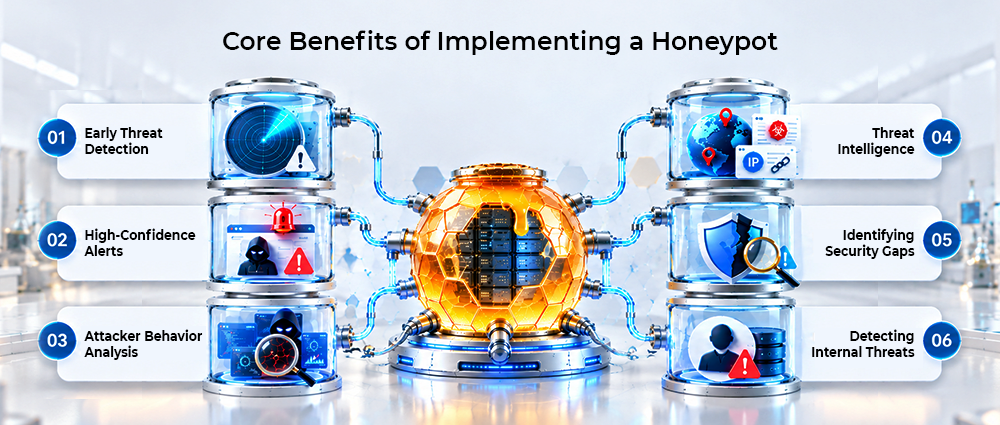
- Early Threat Detection: Honeypots can alert security teams when attackers scan or attempt to access a decoy system, helping identify suspicious activity at an early stage.
- High-Confidence Alerts: Since legitimate users normally have little reason to interact with a honeypot, activity against it can provide a strong signal for potential malicious behavior.
- Attacker Behavior Analysis: Security teams can analyze attackers’ commands, tools, techniques, and movements to better understand how they approach and interact with targeted systems.
- Threat Intelligence: Attack data gathered through Honeypots can reveal malicious IP addresses, domains, malware, and attack methods that security teams can use to improve monitoring and detection.
- Identifying Security Gaps: Activity against a honeypot can reveal weaknesses in existing security controls, helping teams improve detection rules, access controls, and other defensive measures.
- Detecting Internal Threats: Honeypots can also identify suspicious activity from compromised accounts or insiders when they attempt to access decoy systems, databases, or credentials.
Challenges of Honeypots
Although Honeypots can provide valuable intelligence, they also introduce challenges that organizations need to consider before deployment.
- Honeypot Detection and Evasion: Experienced attackers may recognize that they are interacting with a decoy and stop their activity or change their techniques to avoid detection.
- Risk of System Compromise: If a honeypot is not properly isolated, attackers could compromise it and potentially use it as a pathway to reach other systems or resources.
- Limited Visibility: A honeypot only captures activity directed towards the decoy, so it cannot provide complete visibility into all activity across an organization’s infrastructure.
- Maintenance and Resource Requirements: Honeypots need regular monitoring, configuration, updates, and maintenance. High-interaction setups can also take more technical knowledge and resources to manage.
- False Positives and Alert Management: Although activity around a honeypot can provide strong security signals, teams still need to investigate alerts and determine whether the activity represents a genuine threat.
Honeypot vs. Honeynet
A honeypot and a honeynet have the same basic goal of attracting and observing malicious activity, but they differ in scope.
| Feature | Honeypot | Honeynet |
|---|---|---|
| Scope | Focuses on a specific target | Simulates a broader network environment |
| Complexity | Generally easier to deploy | Requires more planning and infrastructure |
| Visibility | Focuses on activity around one decoy | Can show activity across several simulated systems |
| Resource requirements | Usually lower | Generally higher |
| Best suited for | Targeted detection and monitoring | Deeper research and attack-path analysis |
Conclusion
Honeypots give security teams a controlled way to attract, observe, and analyze malicious activity. By creating realistic decoys, organizations can identify suspicious behavior, collect threat intelligence, and discover weaknesses that may require further attention.
Using a honeypot involves more than just creating a fake target. The environment must remain isolated and monitored, while the information it produces should be used with other security controls. This gives security teams a way to study attacker activity and identify threats that could affect critical systems.
Could Attackers Find a Way Into Your Environment?
Find out where your security visibility may fall short and how attackers could target your systems. Talk to the AMSAT team to assess your security and strengthen your defenses.
Frequently Asked Questions